Most automation case studies hide the messy details. This one doesn’t.
When our invoice processing workflow was costing ₹3.2 lakh per month in labor and error correction, I knew something had to change. Three months later, after implementing an AI-powered solution, that number dropped to ₹42,000.
This isn’t a story about “AI transformation” or “digital innovation.” It’s about removing inefficiency with measurable results. Here’s exactly what happened, what it cost, and whether you should try something similar.
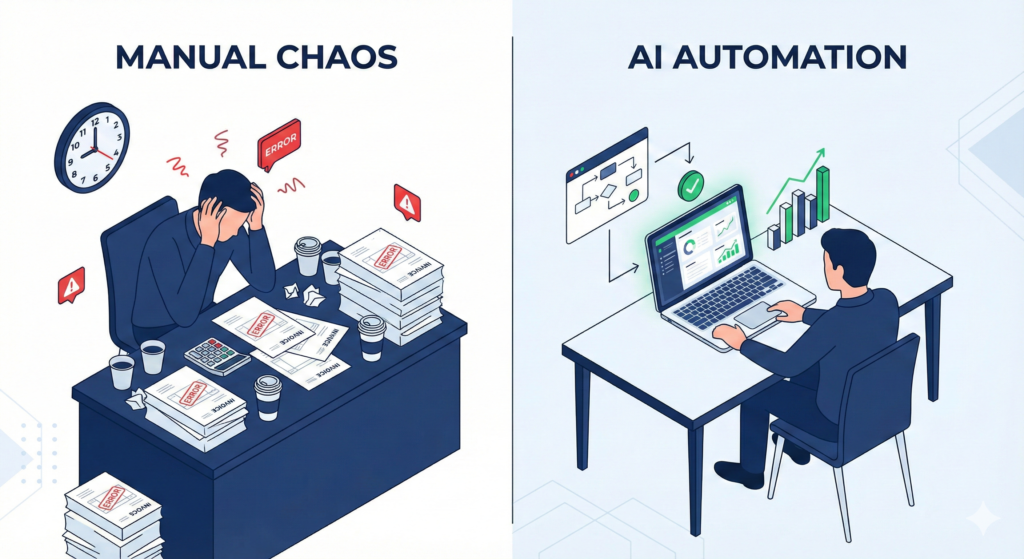
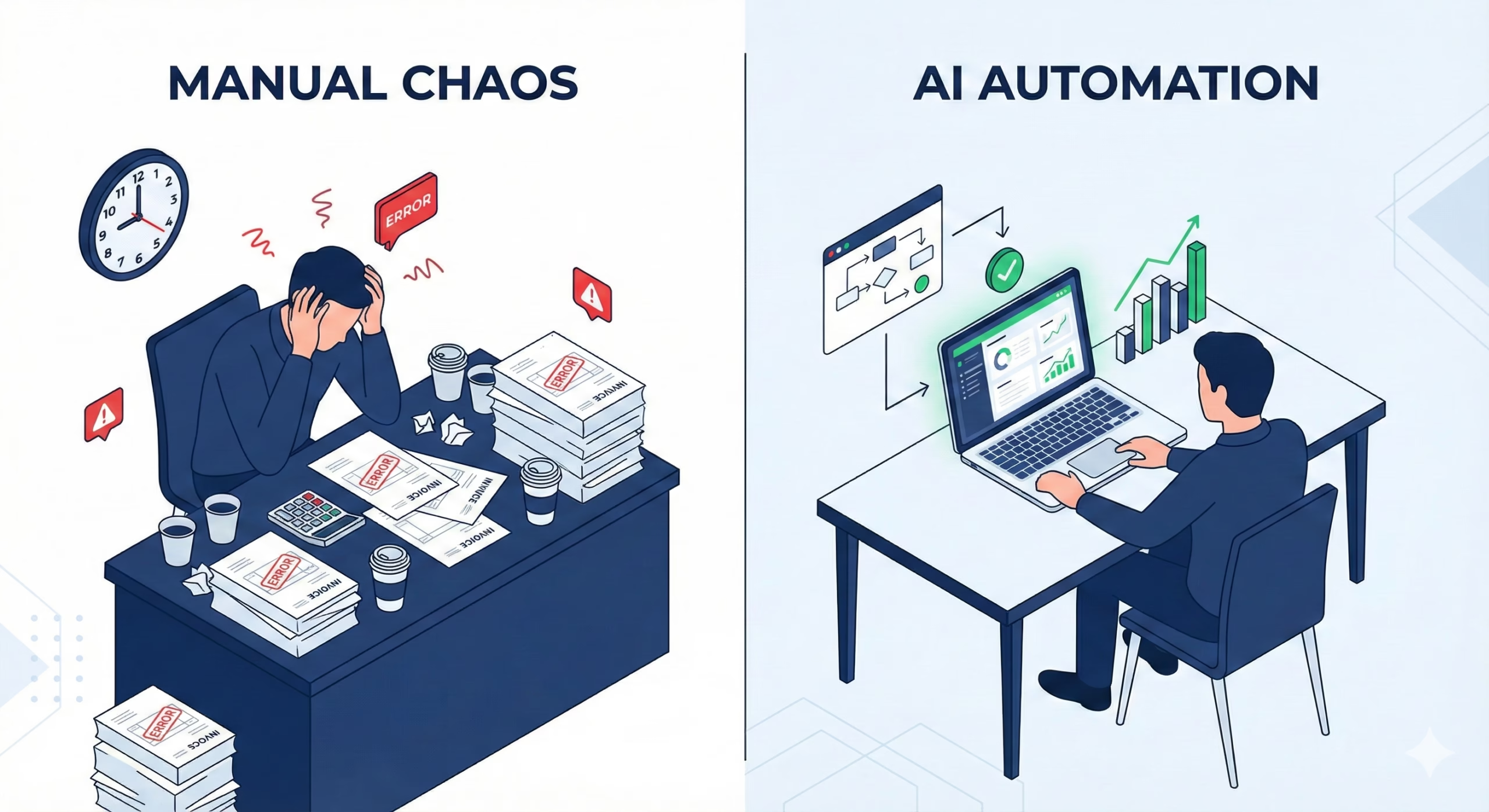
The Manual Process (Before AI)
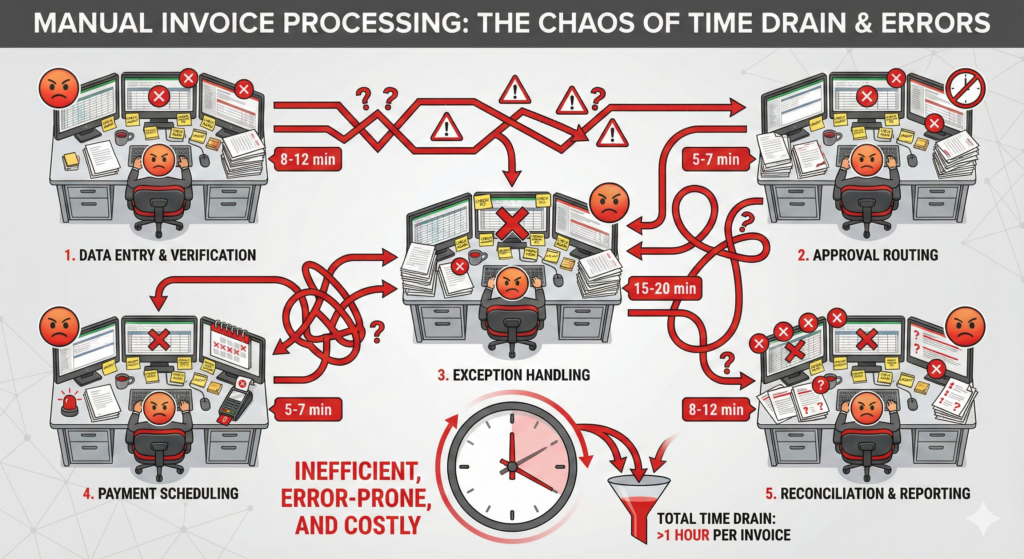
Our accounts payable team processed 400-500 vendor invoices monthly. Each invoice required:
Manual steps per invoice:
- Data entry from PDF/image into accounting system (8-12 minutes)
- Cross-reference against purchase orders (5-7 minutes)
- Approval routing via email chains (15-20 minutes average wait)
- Error correction when data didn’t match (variable, 10-45 minutes)
- Final reconciliation and payment scheduling (5 minutes)
Total time per invoice: 45-60 minutes of human attention.
The hidden costs most people miss:
Context switching killed productivity. Every invoice interrupted other work. Our AP specialists spent their days in reactive mode, never reaching strategic tasks like vendor negotiation or cash flow optimization.
Error rates hovered at 12-15%. Mistyped amounts, wrong GL codes, duplicate payments. Each error triggered a cascade: vendor calls, manual research, correction entries, manager escalations.
Monthly breakdown:
- Labor cost: 3 full-time specialists @ ₹85,000 each = ₹2,55,000
- Overtime during month-end (20-30 hours) = ₹35,000
- Error correction and duplicate payment recovery = ₹25,000
- Opportunity cost of delayed strategic work = Unquantified
Total monthly cost: ₹3,15,000
The Breaking Point
Month-end in March was the final straw. A vendor submitted 47 invoices in one batch, all needing processing within 72 hours for early payment discount eligibility.
We missed the deadline. Lost ₹18,000 in discount opportunities. The team worked until 11 PM for three consecutive nights.
I wasn’t looking for innovation. I was looking for relief.
The AI Solution: What We Actually Built
The painful part didn’t show up until we reached the deployment phase. But I’m getting ahead of myself.
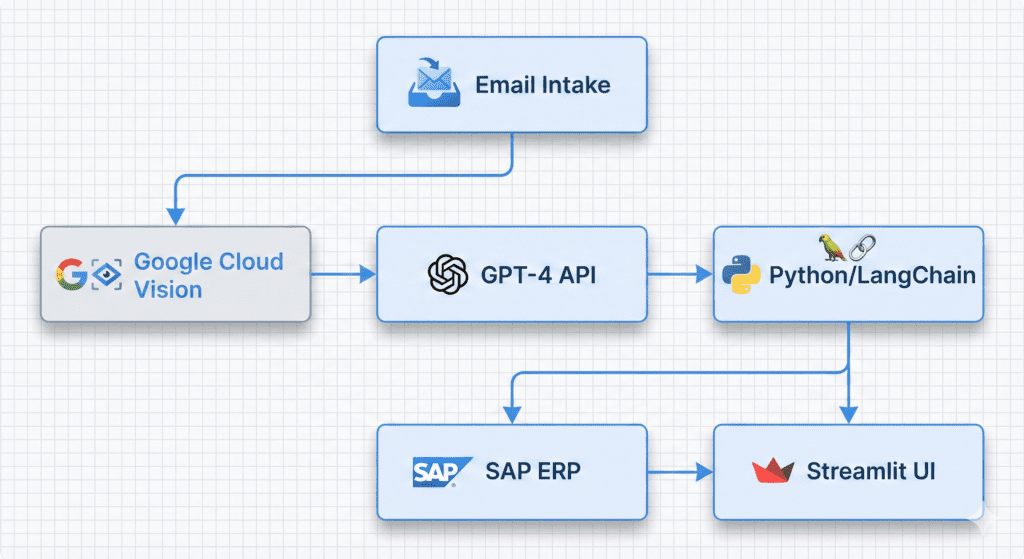
Here’s what we implemented:
Tool stack:
- Document AI (Google Cloud Vision API for OCR)
- Custom Python workflow using LangChain
- Integration layer connecting to our ERP (SAP Business One)
- Simple approval interface built with Streamlit
- Automated email notifications via SendGrid
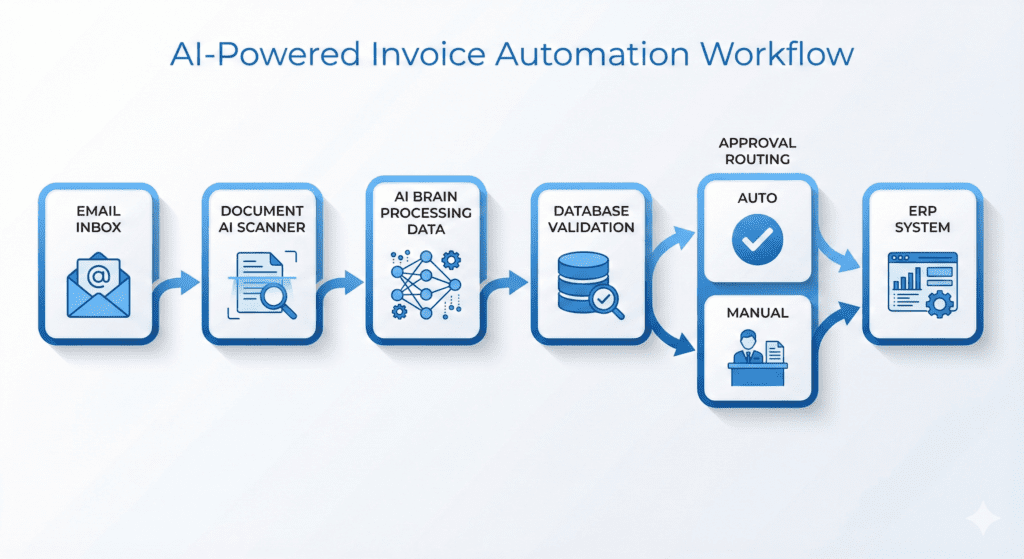
The workflow logic:
- Intake: Vendors email invoices to dedicated inbox
- Extraction: OCR captures all text, AI model (GPT-4) extracts structured data (vendor name, invoice number, date, line items, amounts, tax calculations)
- Validation: Automated cross-check against purchase order database, vendor master file, and historical patterns
- Exception routing: Flagged items go to human review queue with specific issue highlighted
- Approval: Auto-approved within tolerance limits (< ₹50,000 and exact PO match), others routed based on amount thresholds
- Posting: Direct API push to ERP with complete audit trail
Implementation Reality Check
Time to build: 87 hours over 6 weeks
This wasn’t a weekend project. The bottleneck wasn’t the automation—it was defining the business logic.
What took the longest:
Mapping exception rules (22 hours). Our team had tribal knowledge about vendor quirks. “XYZ Corp always includes shipping separately.” “ABC Ltd uses invoice date, not receipt date.” Getting this documented took longer than coding it.
ERP integration (18 hours). APIs existed but documentation was sparse. Lots of trial-and-error on field mapping and authentication.
Change management (ongoing). Teaching the team to trust the system. Early skepticism: “It missed this field.” Reality: they were used to accepting certain errors as normal.
Total development cost:
- Development time (outsourced): ₹2,40,000
- API costs (first 3 months): ₹18,000
- Training and documentation: ₹15,000
Upfront investment: ₹2,73,000
The Results: Exact Numbers
Processing time per invoice:
- Before: 45-60 minutes human time
- After: 3-5 minutes human time (review exceptions only)
82-91% reduction in human processing time
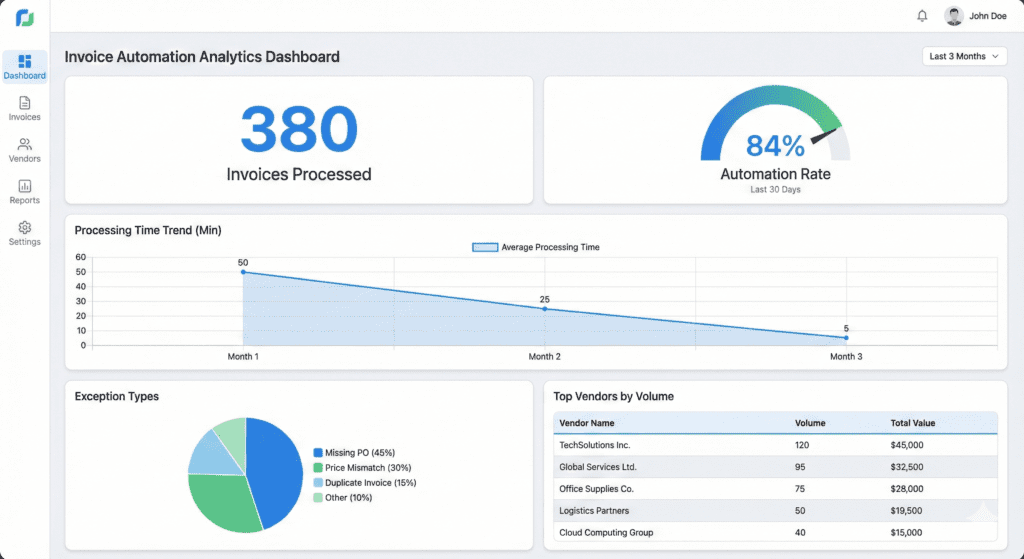
Monthly invoice volume: 450 average
Invoices fully automated: ~380 (84%) Invoices requiring human review: ~70 (16%)
Time savings:
- Automated invoices: 380 × 50 min saved = 316 hours
- Exception invoices: 70 × 30 min saved = 35 hours
- Total: 351 hours saved per month
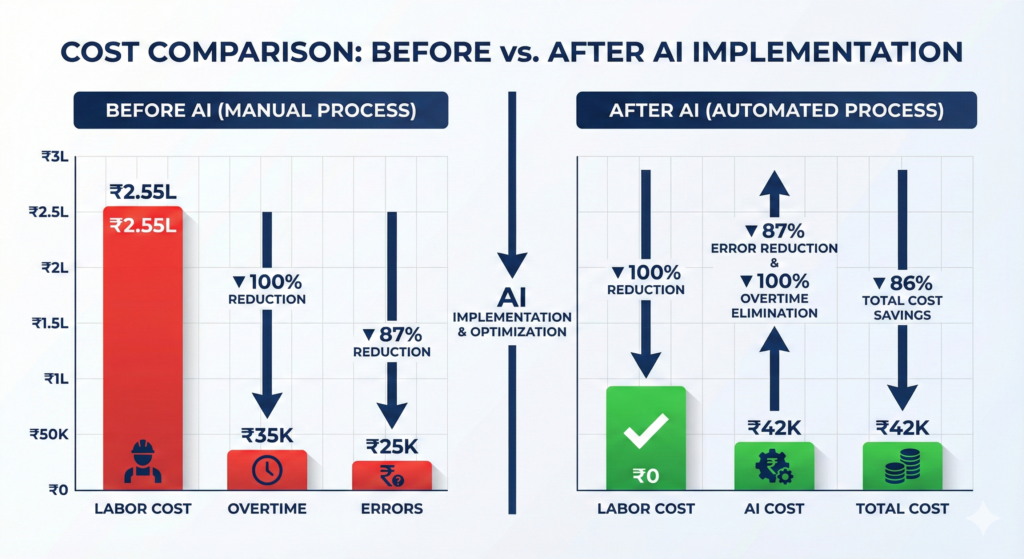
New monthly cost structure:
- AI/API costs: ₹14,000
- One part-time specialist for exceptions (20 hours/week): ₹28,000
- System monitoring and maintenance: Negligible
Total monthly cost: ₹42,000
Monthly savings: ₹2,73,000
Payback period: 1 month (investment recovered in first month of operation)
Error rate improvements:
- Before: 12-15% invoices had errors
- After: 2-3% (mostly edge cases with poorly formatted vendor invoices)
85% reduction in errors
What Actually Drove the Savings
The numbers look dramatic. Here’s what really happened.
Reallocation, not elimination:
We didn’t fire anyone. The three AP specialists transitioned roles:
- One moved to vendor relationship management (negotiating better terms)
- One joined FP&A team (financial planning needed help)
- One became the automation specialist (manages exceptions, trains the model)
Their work became strategic instead of transactional.
Second-order effects:
Vendor relationships improved. Payments became predictable. We started capturing early payment discounts we previously missed (average ₹45,000/month additional savings).
Cash flow visibility increased. Real-time dashboard shows outstanding payables, upcoming due dates, and spending patterns by category.
The FP&A team got accurate accruals data for the first time. Month-end close accelerated by 2 days.
The Unexpected Challenges
Challenge 1: The model confidently extracted wrong data
Early versions of our extraction prompt returned clean-looking output with subtle errors. Invoice #12345 became #12245. ₹1,500.00 became ₹1,50,000.
Solution: Added validation layer that cross-references multiple data points. If extracted invoice number doesn’t match historical pattern for that vendor, flag it. If amount is >2× typical invoice size, flag it.
Challenge 2: Vendor format variations broke the system
Some vendors send itemized PDFs. Others send scanned images of handwritten invoices. A few send Excel files via email.
Solution: Created vendor-specific preprocessing rules. High-volume vendors got custom extraction templates. Long-tail vendors default to conservative “flag for review” approach.
Challenge 3: The approval team resisted
Finance managers worried about “losing control.” Initial reaction: “I need to see every invoice.”
Solution: Implemented graduated confidence scoring. System shows why it’s confident (matched PO, historical pattern, vendor reliability score). After seeing 500 correct auto-approvals, resistance disappeared.
Would This Work for Your Business?
The real bottleneck wasn’t the tools—it was the workflow logic.
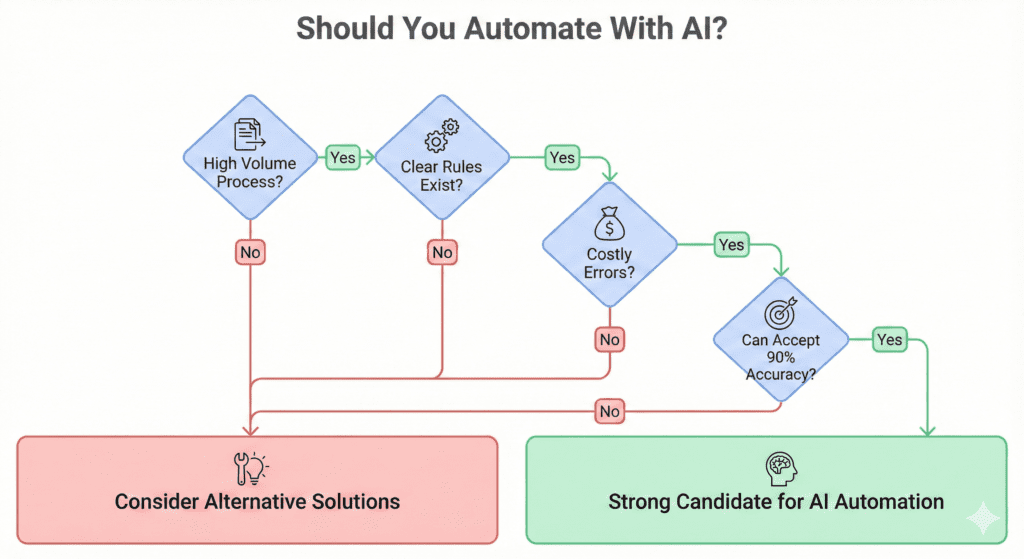
This approach works best when:
You process high volume of similar documents (100+ per month). The economics improve with scale.
Your process has clear rules, even if they’re complex. “If X and Y, then Z” can be automated. “It depends on how I feel today” cannot.
Errors are costly but not catastrophic. Invoice mistakes cost time and money. Medical diagnosis errors cost lives. Know the difference.
You can tolerate 90% accuracy. Our 84% full automation rate means 16% still need human touch. If you need 100%, this won’t work.
This approach struggles when:
Documents are truly unique each time. Legal contracts with novel terms don’t fit patterns.
The process requires judgment calls on ambiguous situations. AI can’t yet handle “Is this expense reasonable given the context?”
You lack technical resources for integration work. The build phase needs either internal dev capacity or budget for contractors.
The Implementation Blueprint (If You Want to Try This)
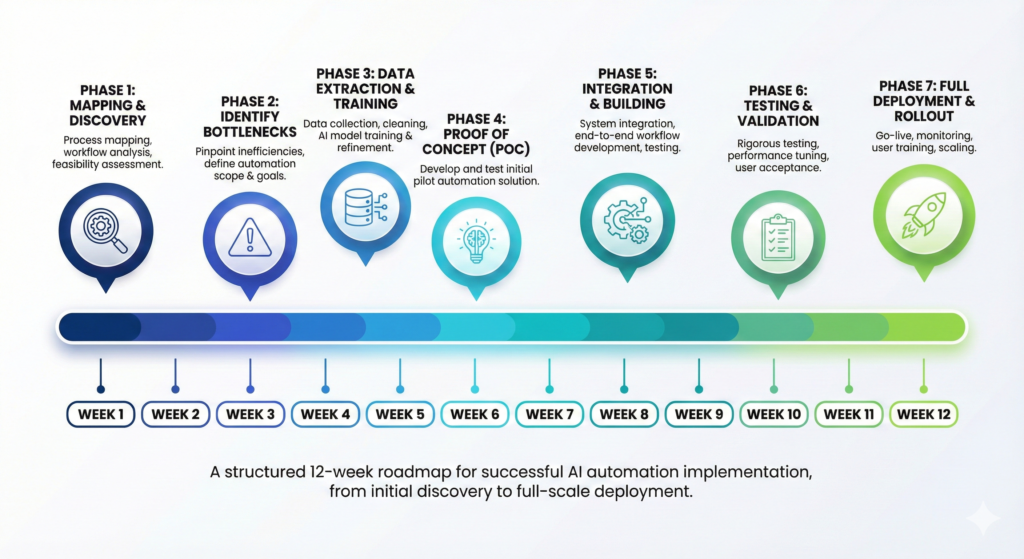
Step 1: Process mapping (Week 1-2)
Document every step of your current manual process. Time each step. Identify decision points. Find where errors occur.
Tools: Spreadsheet, stopwatch, honest conversations with the team doing the work.
Step 2: Bottleneck discovery (Week 2)
Which steps take the most time? Which cause the most errors? Which steps require true human judgment vs. pattern matching?
99% of failed AI projects skip this step. Tools don’t solve problems. Understanding does.
Step 3: Data and logic extraction (Week 3)
Gather sample documents (50-100). Document all the “if-then” rules, even the unwritten ones. Build a decision matrix.
This is where you discover rules you didn’t know you had.
Step 4: Proof of concept (Week 4-5)
Build the simplest version that could possibly work. Use off-the-shelf tools. Don’t optimize yet.
Goal: Prove the concept works on 10 examples before building the full system.
Step 5: Integration and edge case handling (Week 6-8)
Connect to your existing systems. Add error handling. Create the exception management interface.
This takes longer than expected. Budget accordingly.
Step 6: Testing with real data (Week 9-10)
Run in parallel with the manual process. Compare outputs. Find gaps. Adjust rules.
Step 7: Gradual rollout (Week 11-12)
Start with 10% of volume. Move to 50%. Then 100%. Monitor closely. Iterate based on feedback.
What I’d Do Differently
Start smaller. Our first version tried to handle every edge case. We should have automated just the 60% easiest invoices first, then expanded.
Involve users earlier. We built in isolation for 4 weeks before showing the AP team. Their feedback would have saved rework.
Set realistic expectations. I told leadership “90% automation.” They heard “90% perfect.” Clarify that automated ≠ infallible.
Budget for iteration. We spent ₹2,40,000 on development. We’ve spent another ₹60,000 on improvements over 6 months. It’s not build-once, it’s build-and-evolve.
The Bottom Line
What we spent:
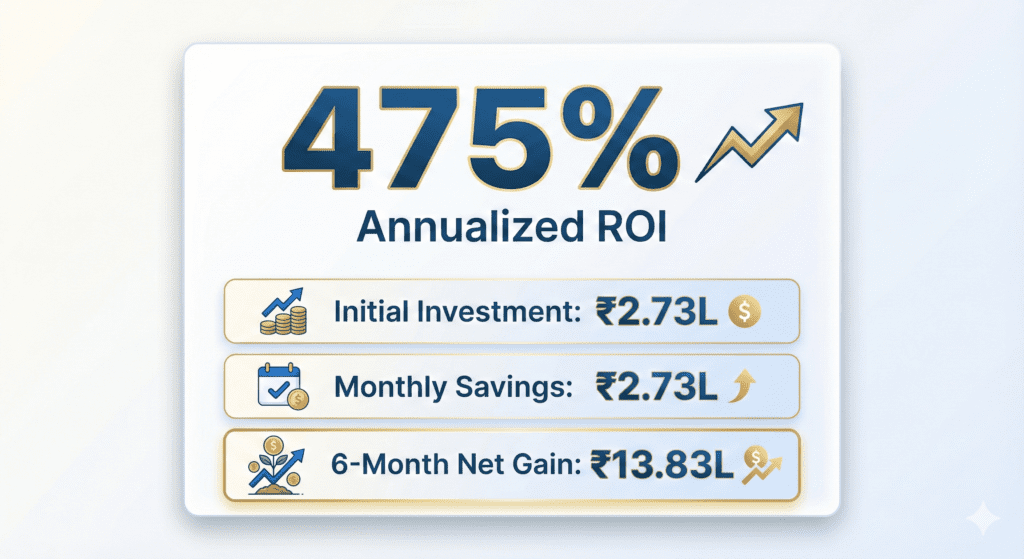
- Upfront: ₹2,73,000
- Monthly ongoing: ₹42,000
- 6-month total: ₹5,25,000
What we saved:
- Monthly: ₹2,73,000 (labor and error correction)
- Additional: ~₹45,000/month (early payment discounts)
- 6-month total: ₹19,08,000
Net 6-month ROI: ₹13,83,000
Annualized ROI: 475%
If You’re Facing Something Similar
AI doesn’t replace people. It replaces tasks that drain payroll without driving revenue.
The companies winning right now aren’t firing teams. They’re refocusing teams on higher-ROI work.
If your operations feel heavy and your team touches things manually that don’t require judgment, start with one question:
“What is costing us time or money that follows a repeatable pattern?”
That’s your automation candidate.
Our invoice processing had a pattern. Your manual workflows might too.
The tools exist. The expertise is available. The question is whether the pain is expensive enough to justify the effort of change.
For us, ₹3.2 lakh per month made the answer obvious.
Technical Appendix: The Exact Tools and Costs
For those who want to replicate this:
OCR and extraction:
- Google Cloud Vision API: ₹0.15 per page
- OpenAI GPT-4 API for structured extraction: ₹0.03-0.08 per invoice
- Monthly API cost for 450 invoices: ~₹14,000
Workflow orchestration:
- LangChain (open source): Free
- Python + hosting (AWS Lambda + RDS): ₹8,000/month
ERP integration:
- SAP Business One API: No additional license cost
- Custom connector development: One-time ₹40,000
User interface:
- Streamlit (open source): Free
- Hosting (AWS EC2 t3.small): ₹3,000/month
Monitoring:
- AWS CloudWatch: ₹2,000/month
Total monthly infrastructure: ₹27,000 Total monthly human oversight: ₹28,000 Combined: ₹55,000 (Note: Actual production cost ₹42,000 due to reserved instance discounts and optimization)
Key Takeaways
Automation is not about job loss. It’s about resource allocation.
The biggest saving came from something we didn’t expect: improved vendor relationships from consistent payment timing.
Most automation tutorials skip the hard part—defining business logic. We spent more time on this than coding.
Start with the painful, repetitive workflows. Not the interesting ones.
The tools don’t matter as much as understanding your current process first.
Budget for iteration. V1 is never the final version.
Want the full workflow blueprint for your business? Comment “ROI” below and I’ll send you the decision framework we used to evaluate automation candidates.